
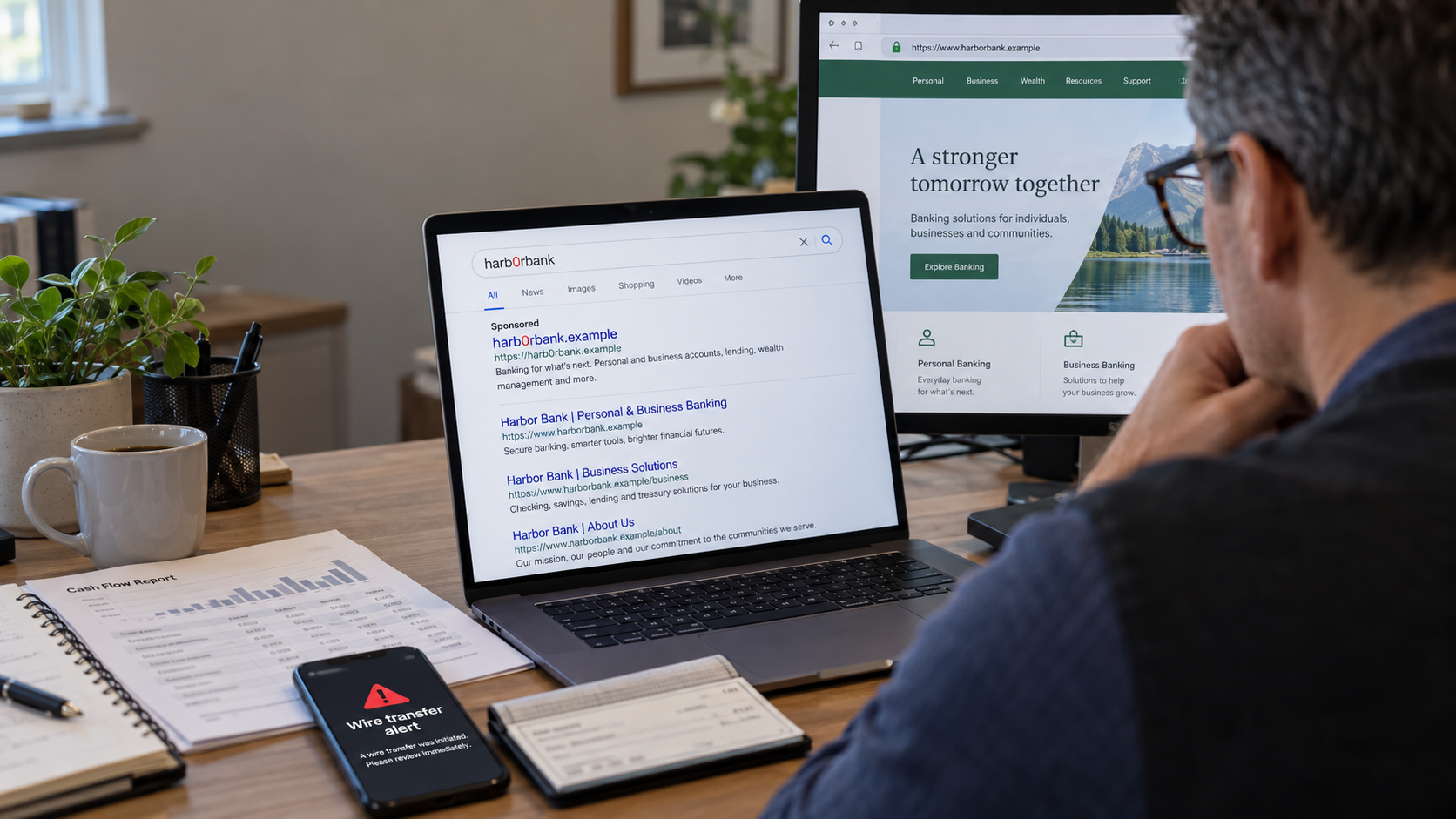
The wire is gone. The employee who handles banking says they didn’t click anything suspicious. They went online, searched for the bank and logged in, just like they always do.
I’d ask them to show me that search.
In a case announced by the Department of Justice in September, prosecutors alleged that a group purchased sponsored search links to lure banking customers onto counterfeit websites. The pages looked like bank login screens. Customers entered their credentials, and the people running the scheme allegedly used that information to access the real accounts and attempt unauthorized wires.
The employee could have followed their usual routine from start to finish. That routine was exactly what the people behind the fake page were counting on.
What happened between the search and the wire?
That’s the part I’d want to reconstruct.
Which result did the employee click? What was the actual web address? Did the password manager recognize it? Was there a request for an authentication code, followed by another request?
When you’re trying to get payroll submitted or a vendor paid, a login problem feels like an inconvenience. You type the password yourself. You request another code. You try again.
Later, those details can help explain how someone got in.
A password manager that usually fills in your credentials but suddenly won’t is worth paying attention to. It may not recognize the address because you aren’t on the bank’s website. Typing the password manually gets you past that warning without resolving it.
The same goes for an unexpected authentication request. Keep multifactor authentication enabled, but don’t assume a code makes a questionable page safe. A fake page can collect the code and pass it along while someone is trying to enter your real account.
A paid advertisement put them there
Most people aren’t studying search results when they need to check a balance. They recognize the bank’s name and click.
Someone buying an advertisement can take advantage of that habit. The result appears above the bank’s own website, where a busy person is likely to see it first.
You can address that without making banking more complicated. Verify the bank’s address and save it as a bookmark. Have everyone with access use that bookmark or the bank’s verified app. Set up the same routine for payroll and other financial accounts.
I would also check the permissions attached to each login. If someone steals an employee’s credentials, can they add a new recipient and wire money without another person approving it? How much can they send? Who receives the alert?
Those answers matter. You want a second person involved before money leaves, with limits and alerts that fit the way the business actually operates.
If the employee thinks the page was fake
Call the bank immediately, using a number already on file. Give the fraud team the time of the login and explain what information was entered. Ask them to secure access, stop pending activity and pursue recovery of any unauthorized transfers.
Save the web address, search result, screenshots, messages and transaction details. Work with the bank to revoke compromised access, change exposed passwords from a trusted device and report the incident at IC3.gov.
The employee needs to know they can tell you right away. If they spend an hour worrying about your reaction, that is an hour the bank doesn’t have.
You don’t have to wait for a missing wire to check this. Ask the person who handles your banking to walk you through their next login.
If they start by searching for the bank, help them verify and save the correct address while you’re sitting there.
