
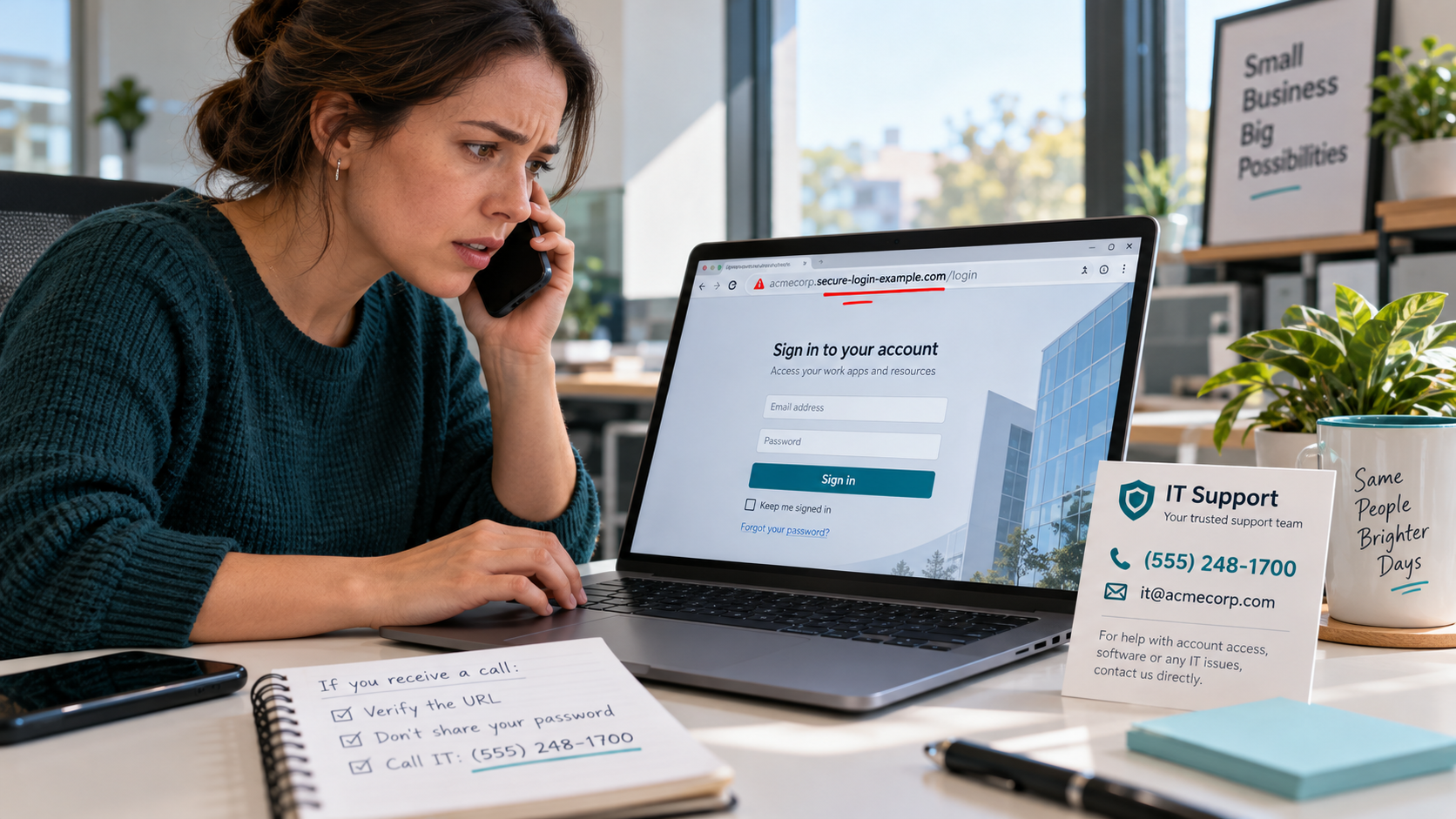
The call does not sound strange at first.
That is the problem.
The caller knows the employee’s name.
Knows the company.
May even know the employee’s title and personal cell number.
Then comes the warning.
Your passkey needs to be updated.
Your MFA is out of sync.
Your single sign-on settings have changed.
Do this now or you could lose access.
That is where I would stop the tape.
Because the interesting part is not what the caller knows.
It is what they want the employee to do next.
Microsoft says it has been tracking active cloud intrusions that begin this way. The attacker pretends to be the company’s IT help desk, walks the employee through what sounds like a legitimate security update, and sends them to a sign-in page.
Sometimes the page looks convincing.
Sometimes part of the process actually takes place on a real Microsoft page.
That is what makes this one worth paying attention to.
The fake part is not always the screen.
Sometimes it is the person standing beside the screen telling you what to type.
The timing helps the scam
Microsoft began rolling out passkeys as the default authentication experience in Entra ID on September 1, 2026.
So employees may really be seeing new prompts.
They may really be hearing more about passkeys.
They may really have been told security changes are coming.
The criminal does not have to invent a new story.
They just have to step into the real one.
That gives the phone call credibility.
“Microsoft changed something.”
True.
“You need to fix it right now with me on the phone.”
That is the part that needs proving.
The passkey may be fine
This is an important distinction.
The attack does not necessarily mean the passkey itself was broken.
Passkeys are built to resist phishing.
So the attacker goes around the passkey.
They attack the setup.
The conversation.
The recovery process.
The person holding the phone.
Microsoft describes one method where a fake site sits between the employee and the real sign-in process and captures what it needs along the way.
Another method is even sneakier.
The caller gives the employee a device code and tells them to enter it on a legitimate Microsoft page.
The page is real.
The code is real.
The problem is that the employee may be authorizing somebody else’s session.
That is the clue.
If you did not start the login, why are you entering the code?
Once they are in, they do not waste much time
Microsoft says attackers have been quick to add another authentication method after gaining access.
A phone number.
An authenticator app.
A software token.
Something they control.
That matters because now the first break-in is no longer the whole problem.
They may have built themselves another door.
From there, the activity gets more interesting.
Microsoft has seen attackers move through identity portals, application portals, SharePoint, OneDrive, and email.
They have also used Microsoft Graph to start figuring out what the account can see.
That is where this stops being “someone got into an email account.”
Think about what sits inside a small business Microsoft environment.
Invoices.
Payroll.
Vendor information.
Contracts.
Customer lists.
Bank instructions.
Tax documents.
Old email threads.
Who approves wires.
Who handles payroll.
Which vendor is expecting a payment Friday.
That mailbox is not just data.
It is reconnaissance.
The URL may look right until you read it backwards
This is one of those clues people miss because the brain sees the company name and stops reading.
Microsoft has seen domains built to look something like:
company-name.secure-passkey[.]com
The employee sees the company name.
Looks familiar.
Maybe even feels reassuring.
But the company name is not the part that tells you who owns the site.
The important part is farther to the right.
That is where I would slow down.
What is the actual domain?
Who owns it?
Did your company send you there through a process you already know?
A familiar word inside a URL proves almost nothing.
The phone call is evidence
I would pay close attention to how the employee describes the call.
Did “IT” call a personal phone?
Did the caller sound rushed?
Did they say the account would be locked?
Did they stay on the line while the employee clicked?
Did they send the link by text?
Did they tell the employee which code to enter?
Those are not side details.
Those may be the best evidence in the whole case.
Especially if the employee opened the link on a personal device that the company was not monitoring.
The logs may show what happened after access was granted.
The employee may be the only person who can explain how the door got opened.
There should be one road to IT
This is the control I would put in place first.
Employees should know exactly how to reach IT.
One known phone number.
One known support portal.
One company directory.
Then make the rule simple.
If someone contacts you unexpectedly about MFA, passkeys, SSO, account activation, or security settings, do not finish the process through that conversation.
End the call.
Close the message.
Contact IT through the normal channel.
If the request was real, IT can pick it back up.
If it was fake, you just broke the scam.
Never type in somebody else’s code
This one deserves its own rule.
If somebody calls and gives you a device code, do not enter it.
A device code is supposed to help you complete a login you initiated.
If you did not start the login, the code is already suspicious.
Do not let the caller explain around that.
Do not let “this is the new process” settle the question.
Verify it separately.
I would also watch for the second door
After an account compromise, do not only reset the password and move on.
Look at the authentication methods.
Was a new phone number added?
New authenticator?
New token?
Anything you do not recognize?
Then look at recent sign-ins.
Unmanaged devices.
New locations.
Odd networks.
And then go farther.
What files were accessed?
What mail was read?
What applications were opened?
Were there new forwarding rules?
New consent permissions?
Messages sent to vendors?
Banking conversations searched?
Invoices opened?
That is where the next fraud may already be taking shape.
If an employee followed the instructions, assume the account was used
Do not treat this like a harmless clicked link.
Use a clean administrator session.
Revoke active sessions.
Remove authentication methods that do not belong.
Reset credentials.
Review sign-ins.
Review permissions.
Review Exchange.
Review SharePoint.
Review OneDrive.
Review Teams.
Review Graph activity.
Then start reading the mailbox like an investigator.
Search for bank changes.
Vendor payment threads.
Wire instructions.
Invoices.
Deleted messages.
Forwarding rules.
Anything that would tell an attacker where the money moves.
Because if they got into the mailbox, they may already know which payment is coming next.
The stranger is the clue
That is the part I would remember.
The security prompt may be real.
The Microsoft page may be real.
The passkey may be real.
The code may be real.
The caller is the piece that does not belong.
So when somebody unexpectedly tries to walk an employee through a security change, do not argue with them.
Do not try to decide whether they sound legitimate.
End the interaction.
Go back to your normal IT channel.
Start over.
The safest question in that moment is not:
“Does this look real?”
It is:
“Why is this person the one telling me what to do?”
